
Integrating a USB palm vein scanner may appear straightforward: connect the scanner to the host device, integrate the SDK and start palm recognition.
In practice, one of the most common integration problems has nothing to do with the palm vein recognition algorithm.
The problem is often the USB port.
Before selecting an external palm vein reader, customers should confirm two fundamental requirements:
- Can the USB port provide sufficient power?
- Does the USB port support bidirectional data communication?
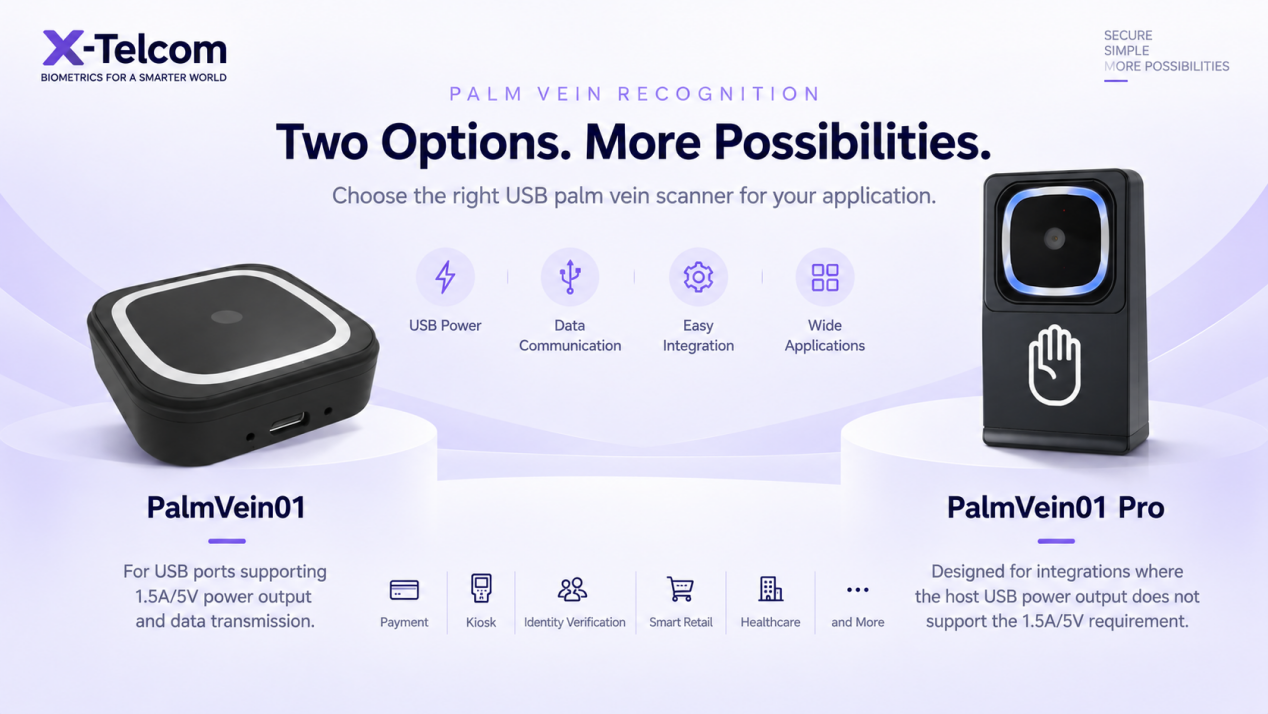
These two questions determine whether X-Telcom PalmVein01 or PalmVein01 Pro is the more suitable palm biometric scanner for your project.
Why USB Power Matters for Palm Vein Recognition
Unlike a simple USB accessory, a palm vein biometric scanner contains optical and infrared components required to capture palm characteristics.
The PalmVein01 requires a stable 5V / 1.5A USB power supply from the connected host device.
If your USB port provides 5V / 1.5A and supports data communication, PalmVein01 can be connected and powered directly through USB.
However, not every host device provides this level of USB power.
This can be particularly relevant when integrating palm recognition with:
- POS terminals
- Payment terminals
- Self-service kiosks
- Access control terminals
- Embedded systems
- Industrial terminals
- Smart vending machines
- Registration and identity terminals
A device may physically have a USB port while still providing insufficient current to reliably operate an external biometric scanner.
What If the USB Port Provides Less Than 1.5A?
This is where PalmVein01 Pro should be considered.
PalmVein01 Pro includes a built-in battery, reducing its dependency on power supplied by the host USB port.
It provides separate USB connectivity for charging and data transmission.
This makes PalmVein01 Pro particularly suitable when the host system supports USB data communication but cannot provide the required power for PalmVein01.
PalmVein01 vs PalmVein01 Pro: Quick Selection Guide
| Requirement | PalmVein01 | PalmVein01 Pro |
|---|---|---|
| USB 5V / 1.5A available | Mandatory | No impact |
| USB power below 1.5A | Can’t work | No impact |
| Built-in battery | No | Yes |
| Can operate while charging | USB plug-and-power-up | Yes. One USB port is for charging, and one USB port is for data transfer |
| Bidirectional USB data required | Yes | Yes |
USB Power Is Only Half of the Question
There is another requirement that is equally important:
The USB port must support bidirectional data communication.
A USB port may provide power without allowing an external palm vein scanner to exchange data with the host operating system.
For both PalmVein01 and PalmVein01 Pro, the host system must be capable of communicating with the scanner.
A charging-only USB port cannot be used for palm vein scanner integration.
PalmVein01 Pro can solve a USB power limitation, but it cannot solve a USB data communication restriction.
This distinction is particularly important when choosing biometric hardware.
My Device Has USB. Why Can’t I Connect a Palm Scanner?
This is a common integration question.
Having a physical USB connector does not automatically mean that the port is suitable for an external biometric device.
Before purchasing or integrating a USB palm vein reader, ask your hardware or technical team to confirm the following:
USB Power
Can the USB interface provide a stable 5V / 1.5A?
USB Data
Does the USB interface support bidirectional communication with an external device?
External Peripheral Support
Can the operating system detect and communicate with an external USB peripheral?
Once these points are confirmed, selecting the appropriate palm scanner becomes much easier.
When Should I Choose PalmVein01?
Choose X-Telcom PalmVein01 when your host device:
- Provides a stable 5V / 1.5A USB output
- Supports bidirectional USB data transmission
- Allows communication with external USB devices
For these environments, PalmVein01 provides a straightforward USB plug-and-power-up palm vein recognition solution.
It is particularly suitable when customers want to add palm vein authentication to an existing hardware platform without requiring a separate biometric terminal.
When Should I Choose PalmVein01 Pro?
Consider PalmVein01 Pro when:
- The USB power output is below the PalmVein01 requirement
- USB power availability is uncertain
- An independent power source is preferred
- The scanner needs to operate while charging
PalmVein01 Pro incorporates a built-in battery and uses separate USB connectivity for charging and data transfer.
The host device must still support bidirectional USB data communication.
Palm Vein Scanner Integration for POS and Payment Applications
These considerations are particularly important for palm payment and biometric POS integration.
Some payment terminals have USB interfaces primarily intended for charging or specific external peripherals.
Before connecting a palm vein scanner to a POS terminal, the POS manufacturer or technical team should therefore confirm the USB specification.
A recommended integration process is:
Check USB power → Check USB data communication → Select PalmVein01 or PalmVein01 Pro → Integrate the palm recognition SDK → Test the complete application
This helps prevent customers from purchasing biometric hardware only to discover later that the host terminal cannot provide sufficient power or communicate with an external USB scanner.
Can PalmVein01 Be Used for More Than Palm Payment?
Yes.
PalmVein01 and PalmVein01 Pro are external palm vein recognition devices, so their potential applications extend beyond payment.
Depending on the software integration and project architecture, applications can include:
- Palm payment
- Identity verification
- Employee authentication
- Self-service kiosks
- Membership systems
- Healthcare identification
- Smart retail
- Other biometric authentication applications
This allows developers and system integrators to add palm recognition capabilities to existing platforms without designing an entirely new biometric terminal.
Frequently Asked Questions
Does PalmVein01 require external power?
PalmVein01 is powered through USB and requires a stable 5V / 1.5A USB supply.
What happens if my USB port provides less than 1.5A?
PalmVein01 cannot operate correctly if the required USB power cannot be provided.
PalmVein01 Pro is designed for scenarios where host USB power is insufficient because it includes a built-in battery.
Does PalmVein01 Pro still require USB?
Yes.
Although its built-in battery addresses the power requirement, USB data communication is still required for integration with the host system.
Can I use a charging-only USB port?
No.
Both PalmVein01 and PalmVein01 Pro require bidirectional USB data communication with the host system.
Can I connect a palm vein scanner to a POS terminal?
Yes, provided that the POS terminal supports communication with an external USB device.
For PalmVein01, the POS must also provide the required 5V / 1.5A USB power.
If USB power is insufficient but bidirectional USB data communication is available, PalmVein01 Pro may be the more appropriate option.
Which palm vein scanner should I choose?
The simplest selection rule is:
5V / 1.5A + USB data available → PalmVein01
Insufficient USB power + USB data available → PalmVein01 Pro
No USB data communication → Neither model can communicate with the host through that USB interface.
Check Before You Order
Selecting a palm vein biometric scanner should start with the host interface, not simply the scanner specification.
Before ordering PalmVein01 or PalmVein01 Pro, confirm these two essential requirements:
POWER: Does the USB interface provide 5V / 1.5A?
DATA: Does the USB interface support bidirectional communication with an external device?
Once these specifications are known, the X-Telcom team can help determine the appropriate hardware configuration for your palm recognition project.
Whether you are developing palm payment, biometric authentication, access control, smart retail or kiosk applications, checking these requirements at the beginning can significantly reduce integration problems later in the project.